Fresh from Shipaton

Yoribako
You find a place you want to visit, you take a screenshot, and it disappears into you…
Loading activity…
2026Shipaton
CategoryLifestyle
Developerharu komatsuda
iPhone · iPad



About this app
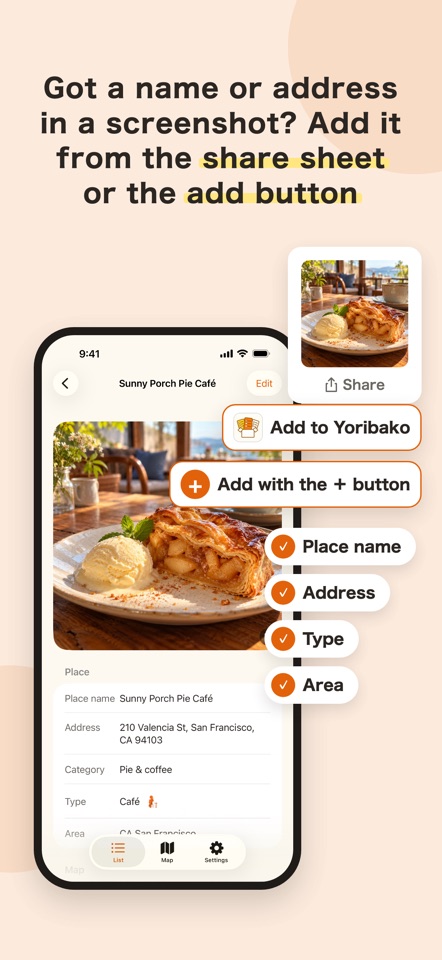
You find a place you want to visit, you take a screenshot, and it disappears into your camera roll. Yoribako turns those screenshots into a list you will actually use. Share a screenshot to Yoribako and it becomes a saved place. You do not type the name or the address. ■ Just share a screenshot Yoribako reads the text on the image and pulls out the name, the address and the opening hours. Nothing to fill in by hand. You can also pick a photo from your library instead. ■ It sorts itself An area is taken from the address, and a category is chosen from the content: Eat, Café, Drinks, Onsen & sauna, Shrines & temples, Sights, Art & museums, Nature & parks, Things to do, Shop, Stay. No folders, no tags, nothing to maintain. ■ Find it again when the trip is decided Filter by area and by category, so once you know where you are going you can pull up the places you saved for exactly there. You can also see everything on a map. ■ One tap when you have been Switch a place between "Want to go" and "Visited". That is the whole record-keeping. For a place marked “Visited”, take a screenshot on its detail screen to make a tall card with one photo and the place’s name, category and area. You can share it or save it to Photos, and add a “Done!” stamp. On the map, visited places appear as a photo frame with their first photo. ■ A notification when you are nearby Turn it on in Settings and Yoribako tells you when you come within 1 km of a place you saved. Whether you are nearby is decided entirely on your device; neither your location nor the place leaves it. At most 3 notifications a day (20 with Premium), and none at night. It is off by default. ■ For trips and for everyday Not only restaurants. Sights, hot springs, places to stay, cafes and shops all live in the same box. ● Privacy What you save (names, addresses, notes, images, recognized text and links) stays on your iPhone, and in your own iCloud if you turn on backup. The developer cannot read it, and it is never collected on our servers. Yoribako never opens a saved link to fetch what is behind it. A link is stored only so that you can open it yourself later. When you share or save the card for a visited place, the app itself sends nothing. It only hands the card to the destination you pick in the share sheet, or adds it to Photos (it never asks to read your photos). The free version shows ads. For advertising, device information (advertising ID, device type, approximate region) is sent to Google. What you have saved is never used for advertising. ● Pricing Yoribako is free to use. The free plan keeps up to 100 places in total, and after every ten you add, a short video lets you keep going. Deleting a place frees up room for a new one. Viewing, editing and deleting saved places is never limited. Yoribako Premium removes the registration limit, removes ads, turns on automatic iCloud backup, and raises the daily limit for nearby notifications from 3 to 20. You can also keep up to 5 images per place (2 on the free plan). ● Auto-renewable subscription terms - Plan: Yoribako Premium, monthly or yearly - The yearly plan includes a 7-day free trial - A one-time lifetime purchase is also available; it never renews - Payment is charged to your Apple Account at confirmation of purchase - The subscription renews automatically for the same period and price unless auto-renew is turned off at least 24 hours before the end of the current period - Your account is charged for renewal within 24 hours before the end of the current period - You can manage or cancel in Settings > your name > Subscriptions on your iPhone - If you buy while a free trial is still running, the remaining free period is forfeited - Terms of Use: https://sunny10side.com/yoribako-terms/ - Privacy Policy: https://sunny10side.com/yoribako-privacy-policy/


