Fresh from Shipaton

XConnect - SSH & RDP Client
XConnect brings SSH, Telnet, SFTP and Windows Remote Desktop together in one app buil…
Loading activity…
2026Shipaton
CategoryUtilities
Developer振海 张
iPhone


About this app
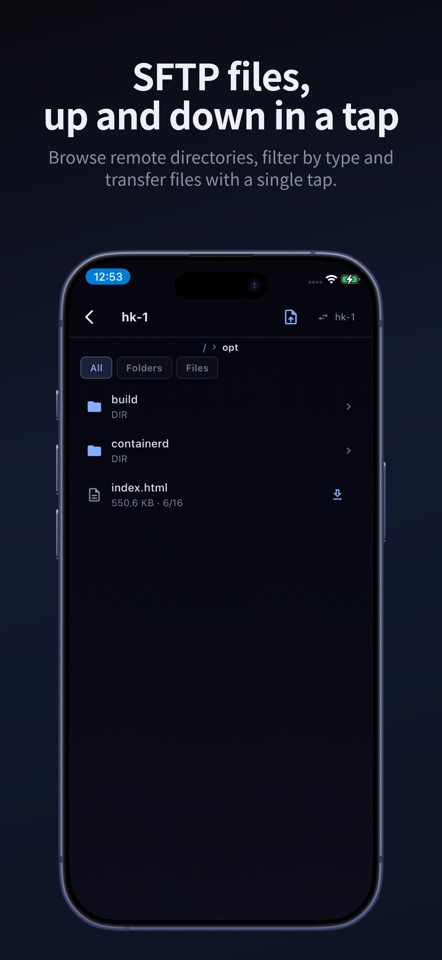
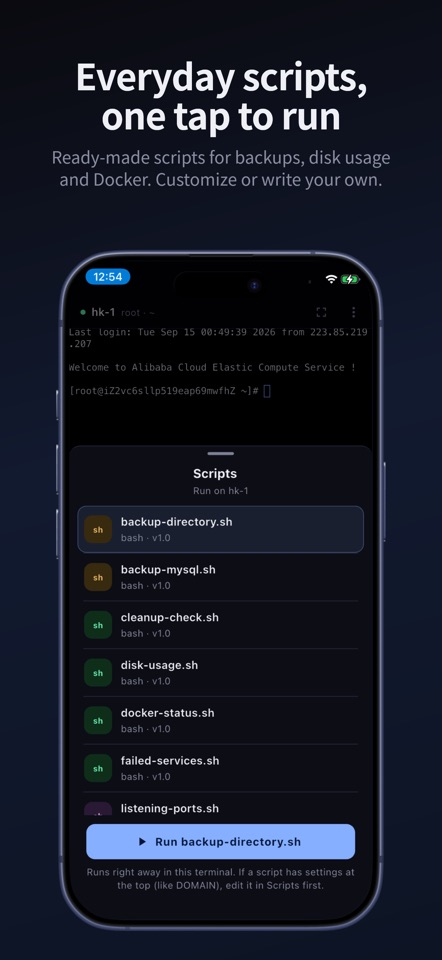
XConnect brings SSH, Telnet, SFTP and Windows Remote Desktop together in one app built for iPhone. Manage Linux servers, reach Windows machines and move files, all from your pocket. REMOTE DESKTOP THAT WORKS ON A PHONE XConnect includes a full RDP client, not screen mirroring. Switch between trackpad and direct touch, scroll with two fingers, pinch to zoom, right-click, and use a hardware keyboard with sticky modifier keys. A TERMINAL MADE FOR TOUCH • A dedicated key row puts arrows, Ctrl and other essentials above the keyboard • Full-screen mode for long sessions • SSH with password or key authentication, plus Telnet for legacy devices • Jump hosts work like OpenSSH ProxyJump, so you can reach servers on private networks AN AI ASSISTANT THAT GETS THINGS DONE Describe the task, such as "check how much disk space is left", and the assistant plans it, runs the commands on your server, reads the real output and reports back. Before anything destructive, it stops and asks for your confirmation. Connect the AI provider of your choice. SCRIPTS, READY TO RUN Start with ready-made scripts for backups, disk usage, Docker, listening ports, failed services and more. View and edit them on your phone, or write your own, then run them on any connected server. SFTP FILE MANAGEMENT Browse remote directories, filter by files or folders, and upload or download with a tap. LOCAL FIRST, PRIVATE BY DESIGN Your connections, groups, scripts and keys are stored encrypted on your device. No account is needed to use SSH, Telnet and SFTP. When you want your setup on more devices, turn on sync: it is end-to-end encrypted, so the server never sees your data in plain text. XCONNECT PRO Free: SSH, Telnet, SFTP, the script library and one jump host. Pro unlocks: • Remote Desktop (RDP) • The AI assistant • Running scripts from the terminal • Unlimited jump hosts • End-to-end encrypted cloud sync across your devices XConnect Pro is available as an auto-renewable subscription. Payment is charged to your Apple ID at confirmation of purchase. The subscription renews automatically unless it is canceled at least 24 hours before the end of the current period. You can manage or cancel it in your App Store account settings. Pro is tied to your XConnect account, so sign in first to subscribe. Terms of Use: https://xconnectapp.com/ios/terms.html Privacy Policy: https://xconnectapp.com/ios/privacy.html


