Fresh from Shipaton

ThatFridge: Kitchen Assistant
Know what's in your fridge before you open the door.
Loading activity…
2026Shipaton
CategoryFood & Drink
DeveloperNaufal Kamaruddin
iPhone · iPad




About this app
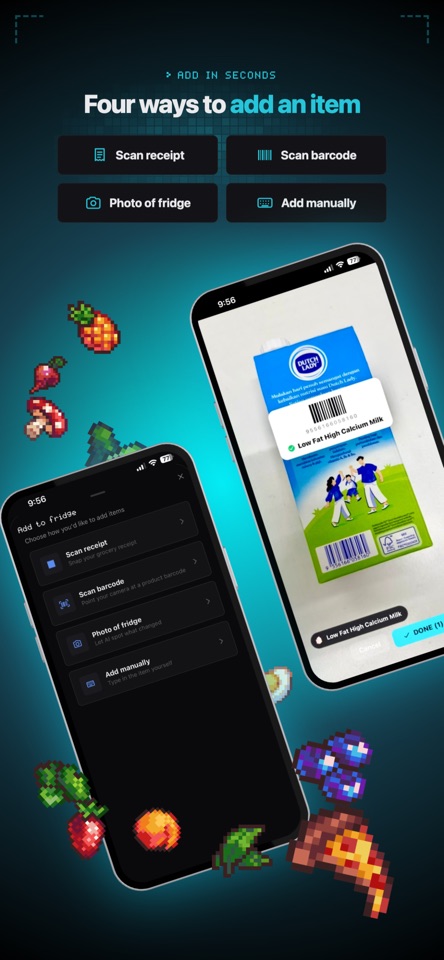
Know what's in your fridge before you open the door. ThatFridge is your all-in-one kitchen assistant: it tracks your groceries, warns you before food goes off, plans your meals, writes recipes and answers questions with an AI kitchen crew, so less food ends up in the bin. TRACK EVERYTHING - Fridge, freezer and pantry in one place, with several fridges if you need them - Add by barcode, receipt, fridge photo, expiry-date photo, voice or typing - Auto-filled icon, shelf life, storage spot, weight and calories, or Autofill anything that's missing - Custom fields like Protein, Brand or Batch code, and Autofill can fill them in for you - Categories, search, and select several items to move or remove at once - Pretty icons: pick from the food icon pack or generate your own NEVER MISS A DATE - Freshness score and clear days-left on every item - Reminders before things expire, and a shorter shelf life once you open something - A regular fridge check-in reminder - Undo when you remove something, and it counts whether you used it up or threw it out MEALS AND RECIPES - Meal plan and Calendar: plan by day, see calories per meal and per day, tick meals off, and get a reminder at mealtime - Recipe book with your own recipes, links imported from the web, photos, favourites, cook-time and calories per serving - Ask Chef: describe what you fancy and get a full recipe, or have Chef plan your week from what's about to expire - "What should I eat?" ideas from what you have right now YOUR AI KITCHEN CREW - Quick Chat with Chef, Guardian, Organizer and Shopkeeper - Chat by text or voice, and attach photos or PDFs - Attach an item, a fridge, a recipe, a day, your meal plan, your shopping list or what's expiring - The crew can add items, tick off the shopping list, leave notes and plan meals for you, and it remembers your preferences (you control what it remembers) - Organizer checks whether things are stored in the right place AUTOMATE IT (KITCHEN LAB) - Build automations with ready-made templates or just describe them - Run on a schedule, when something is added, when stock crosses a level, or when you cook a recipe - Try one out first, and undo what it did SHOPPING AND NOTES - Shopping list with "running low" suggestions and buy links - Sticky notes on the fridge for the household SHARE WITH YOUR HOUSEHOLD - Invite people to a shared fridge, so everyone sees the items, the shopping list and the notes - Find friends, and manage invites and join requests INSIGHTS AND MOTIVATION - One Insights page: kitchen score, waste versus used up, weekly calories and your food groups, in simple charts - Daily streak and badges for real anti-waste habits - Explore: search recipes, automations, meal plans and food icons YOU'RE IN CONTROL - Sign in with Apple, Google or email - Light and dark mode - Sharing anything to improve suggestions is optional; delete your data any time in Privacy & data FREE, WITH OPTIONAL PRO ThatFridge is free to use. AI features run on credits: free accounts get 50 every month and you can buy more any time. ThatFridge Pro gives you 400 credits a month (unused credits roll over up to 800), more than one fridge, and hosting a shared fridge for your household. Pro is a monthly or yearly subscription, each with a 7-day free trial. Prices are shown in the app in your local currency. Payment is charged to your Apple ID at confirmation of purchase. Subscriptions renew automatically unless cancelled at least 24 hours before the end of the current period. Manage or cancel any time in your Apple ID account settings. Terms of Use: https://thatfridge.com/terms Privacy Policy: https://thatfridge.com/privacy Terms of Service & EULA: https://www.apple.com/legal/internet-services/itunes/dev/stdeula/


