Fresh from Shipaton


ScrollLok: Social Lock
ScrollLok is a digital wellbeing and focus app that helps you reduce distractions, bu…
Loading activity…
2026Shipaton
CategoryLifestyle
DeveloperMKumar
Android




About this app
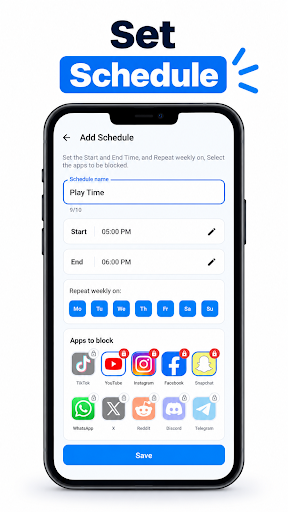
ScrollLok is a digital wellbeing and focus app that helps you reduce distractions, build better screen-time habits, and stay focused on what matters. Create customizable focus schedules that lock selected social media and other distracting apps during study, work, sleep, or personal time. When a scheduled time begins and you open a locked app, ScrollLok shows a lock screen and returns you to your home screen. FEATURES • Schedule-based app locking: choose the apps, the days and the start and end times • Multiple schedules, for example Sleep, Study and Play time • Quick-start schedules for sleep and study, ready to edit or replace • Start, pause and resume your schedules from the Home screen • History of your focus sessions HOW APP LOCKING WORKS ScrollLok uses two standard Android permissions that you turn on yourself in system Settings: • Usage Access: lets ScrollLok see which app is currently in the foreground, so it knows when a locked app is opened during a schedule. ScrollLok uses this only to apply your schedules. • Display over other apps: lets ScrollLok show its lock screen on top of a locked app. ScrollLok does not use the Accessibility Service. It does not read the content of other apps, your messages, or your personal information. It only checks which app is open in order to apply the schedules you set. While a schedule is running, ScrollLok shows a persistent notification so you can see that locking is active. FOR PARENTS ScrollLok can help parents encourage healthier screen-time habits on a shared or child-used device by setting focus schedules for study, bedtime, or other set times. ScrollLok is designed to be set up and managed by an adult. FREE ACCESS AND SUBSCRIPTION • Try ScrollLok free for 7 days. Tap "Continue free for 7 days" when you first open the app. No payment or account is needed. • After the 7 days, a subscription is required to keep using ScrollLok and locking apps. • Subscriptions are monthly or yearly and are billed through your Google Play account. Prices are shown in the app in your local currency. • Eligible new subscribers may also start a Google Play free trial when subscribing. You are charged only when the trial ends, and you can cancel any time before that. • Subscriptions renew automatically unless canceled at least 24 hours before the end of the current period. Manage or cancel any time in Google Play: Menu > Payments & subscriptions > Subscriptions. • Use "Restore" in the app to restore an existing subscription on a new device. Terms of Use: https://scrolllok.com/terms.html Privacy Policy: https://scrolllok.com/privacy.html Whether you are a student trying to concentrate, a professional who wants distraction-free work time, or a parent helping the family manage screen time, ScrollLok gives you simple tools to build healthier digital habits. Scroll less. Focus more. Take control of your screen time with ScrollLok. • Try ScrollLok free for 7 days, no payment needed • Clearer subscription screen with a visible close button • App locking now works without the Accessibility Service; only Usage Access and Display over other apps are needed • Improvements and bug fixes


