Fresh from Shipaton

ReadyKit
Keep the right text, links, images and files ready for your next handoff.
Loading activity…
2026Shipaton
CategoryProductivity
DeveloperChad Smith
iPhone · iPad


About this app
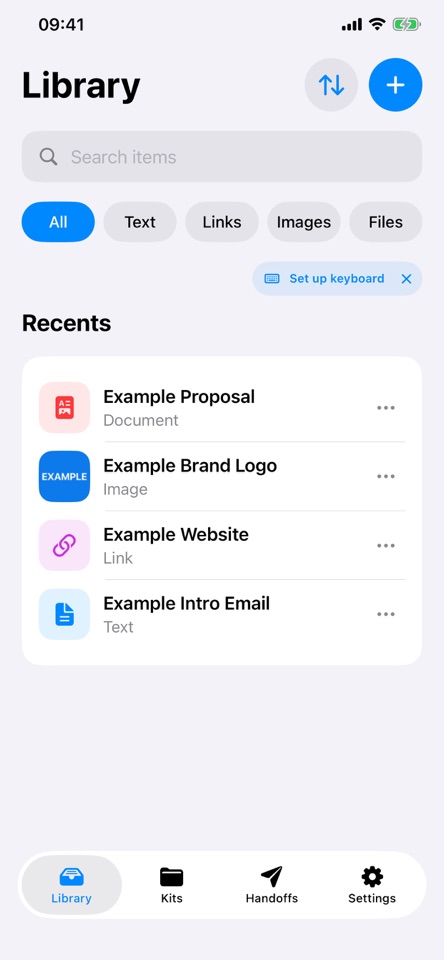
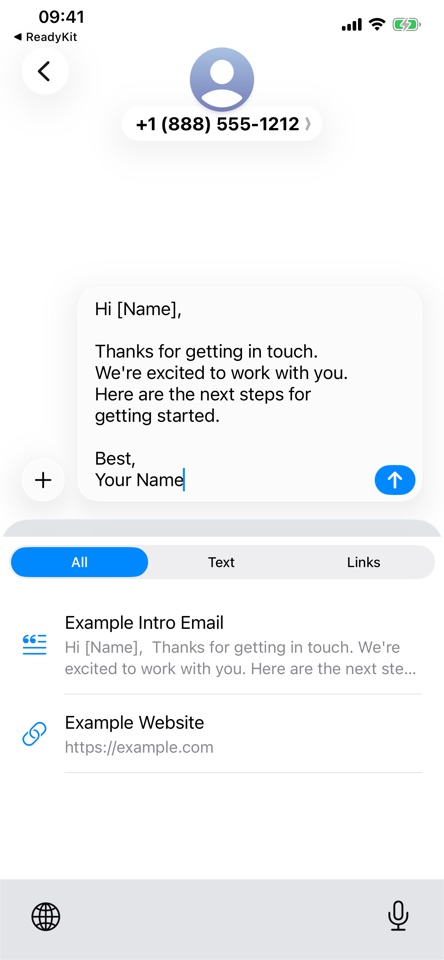
Keep the right text, links, images and files ready for your next handoff. ReadyKit brings reusable content together in Kits, keeps favourites close with pins, and lets you insert saved text and links from its optional keyboard. GET STARTED Explore an example Kit and its sample items, or begin with an empty Library. Add text and links directly from their Library tabs, and add images or files when you need them. SAVE AND FIND Save text, URLs, images and files. Share content from another app straight to ReadyKit, either as individual items or, when sharing several items, as a new Kit. Name items, search your Library and pin the content you use most. REUSE WITH KITS Combine items in a Kit, arrange them in the order you want to share, duplicate a Kit when you need a starting point, and update shared details for each use. Keep revisions as item versions and choose the version you want to include. USE THE READYKIT KEYBOARD Insert saved text and links in other apps without Full Access. If you choose to enable Full Access, you can also tap Paste copied text after copying text in another app. The new text appears in the keyboard immediately and is saved to your Library when you next open ReadyKit. The keyboard makes no network requests. Once imported into Library, captured text syncs to your private iCloud database only if you turn on iCloud Sync. PREPARE WITH CONFIDENCE Preview a handoff and export its exact snapshot. Later edits to source items do not change an existing saved handoff. START FREE Save unlimited basic items, maintain up to 3 active Kits, use one pin in each category, and access each item's current and previous version. Search, shared fields, keyboard access and saved handoffs are included. READYKIT PRO Subscribe monthly or annually for unlimited active Kits, multiple pins per category and complete version history. Eligible subscribers can try the annual plan free for 7 days. See the app for local pricing and eligibility. If Pro ends, choose 3 Kits to keep active. Other Kits and older item history stay saved, with access restored when you resubscribe. Subscriptions renew automatically until cancelled. Manage or cancel your subscription in your App Store account settings. Terms of Use (EULA): https://www.apple.com/legal/internet-services/itunes/dev/stdeula/ OPTIONAL ICLOUD SYNC Keep your Library, versions, Kits and saved Handoffs in sync across devices using the same Apple Account. Turn it on in Settings when you want it. Your content stays available offline.


