Fresh from Shipaton

2026Shipaton
CategoryProductivity
DeveloperZentropi LLC
iPhone · iPad



About this app
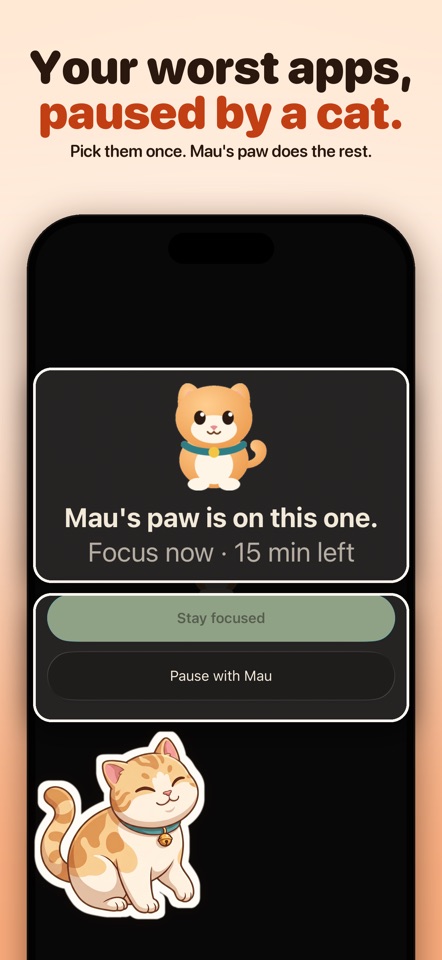
Stuck in the scroll again? Meet Mau — the cat who gets you out. The feed never ends. Your time does. Pawwall puts a warm, stubborn cat between you and your doomscroll: pick the apps that eat your evenings once, and Mau pauses them with Apple's Screen Time — on a schedule, or right now. GET YOUR TIME BACK Every hour Mau guards is an hour you keep. Home shows your day in real numbers: the time guarded today, how often you reached for a paused app and backed off, a seven-day strip, and your goal — under the hours a day you told Mau. Nothing is invented; everything is counted on your device. SEE YOUR LIFE IN SCREEN YEARS Setup takes a few honest questions: your name, your hours a day, the habits you want to change, your age. Then Pawwall shows something no statistic can — 90 dots, one for each year of a life, and how many would go to screens at your pace. Every figure is an estimate computed on your device from your own answers, and Mau builds your first plan around winning some of those years back. YOUR WORST APPS, PAUSED BY A CAT Choose your apps or whole categories once. Set a plan — Night focus, a work block, or Focus now for 15, 25, 45 or 60 minutes — and Mau keeps watch. Open a paused app and Apple's system shield appears: "Mau's paw is on this one." with your plan and the time your apps come back. "Stay focused" closes it. SLIPPED? NO SHAME. "Pause with Mau" opens Court: a breathing Mau, one breath ring, and one honest question about what pulled you in — boredom, stress, habit, FOMO. Then it's your call: "I'm good," or open the app for five minutes. No shame spiral, no guilt mechanics. PROOF IT'S WORKING Tap Mau for "Your week with Mau": the hours Mau guarded, the times you backed off, your best day, and how each plan kept its word — real numbers from your own device, shareable as a night card. Your Quiet Score keeps the long count alongside. MAU'S ON DUTY FROM MINUTE ONE Subscribe or start the 7-day free trial and Mau greets you by name with your first plan armed. One tap — "Protect the next 25 minutes" — guards the apps you already chose. Mau breathes, blinks, twitches an ear and reacts to your day; soft sounds respect your silent switch, gentle haptics mark every kept session. Home Screen widgets, Live Activities and the Dynamic Island keep your focus status one glance away. QUIET BY DEFAULT Every reminder is opt-in. Plan-start alerts are off until you turn them on, per plan. "Check-ins from Mau" — an occasional nudge back, sent by push — is off by default and sends nothing unless you switch it on. Two days before a free trial ends, one local reminder recaps the week you actually had and says plainly when the trial ends and that you can cancel anytime. PRIVATE BY DESIGN No ads. No account. Pawwall never reads what you do inside your apps; your app choices and focus history stay on your device. Anonymous usage analytics (coarse events, never which apps) help us improve and can be switched off anytime in Settings. MEMBERSHIP — MAU'S CIRCLE Pawwall is a subscription app: one circle, every feature included. Start with a 7-day free trial on the annual plan, then $49.99/year (best value) — or choose $5.99/week with no trial. Payment is charged to your Apple ID at confirmation of purchase. Subscriptions renew automatically unless cancelled at least 24 hours before the end of the current period; manage or cancel anytime in Settings › Apple ID › Subscriptions. Any unused portion of a free trial is forfeited when you purchase. Restore Purchases, Terms and Privacy are on the membership screen. REQUIREMENTS, HONESTLY Pausing apps requires Apple's Family Controls authorization. Pawwall is made for adults managing their own device and attention — it is not a parental-control product. If Screen Time authorization is unavailable or denied, Pawwall tells you plainly and shows how to turn it on; it never pretends your apps are paused.


